









Association Rules Mining
Association Rule Mining is an unsupervised learning technique used to extract interesting correlations, frequent patterns, associations or casual structures among sets of items in transaction databases or other data repositories. The primary objective of association rule mining is to identify frequent itemsets and generate rules that describe relationships between items. These rules are typically evaluated using metrics such as support, confidence, and lift, which help assess their significance and usefulness.1
This section describes the key metrics used in frequent pattern mining and association rule learning. These measures determine which itemsets are considered frequent and which association rules are meaningful, based on the thresholds defined during configuration. Understanding these metrics is essential for correctly interpreting the output of algorithms such as Apriori, Eclat and FP-Growth, as they quantify frequency, predictive strength, and the significance of relationships between items. The following subsections provide the formal definitions and interpretations of Support, Confidence, and Lift.
Support
Support represents how frequently an itemset appears in the dataset. It is calculated as the proportion of transactions that contain the specific combination of items. Itemsets with higher support occur more often and are considered more significant within the dataset. The Support threshold is used to filter out itemsets that are too rare to provide meaningful insights. Formally, for an itemset X, the support is computed as:
A higher support value indicates that the itemset occurs more frequently in the dataset. The minimum support threshold determines which itemsets are considered frequent and eligible for further analysis.1
Confidence
Confidence represents the reliability of an association rule. It measures how often the consequent of the rule appears in transactions that already contain the antecedent. Rules with higher confidence are considered more predictive and therefore more meaningful within the dataset. The Confidence threshold is used to exclude rules that do not exhibit a sufficiently strong conditional relationship. Confidence quantifies the conditional probability of the consequent given the antecedent. Formally, for a rule X→Y, the confidence is computed as:
A higher confidence value indicates that the consequent occurs frequently when the antecedent is present. The minimum confidence threshold determines which rules are retained for analysis based on their predictive strength.
Lift
Lift represents the strength of an association rule by comparing the observed co-occurrence of the antecedent and consequent to the expected co-occurrence if the two were statistically independent. A rule with lift greater than 1 indicates a positive association between the items, meaning they appear together more frequently than expected by chance. Conversely, a lift value below 1 suggests a negative or weaker relationship. The Lift threshold is used to retain only rules that reveal meaningful dependencies between itemsets. Lift quantifies how much the occurrence of the antecedent increases the likelihood of the consequent. Formally, for a rule X→Y, lift is computed as:
A higher lift value indicates a stronger and more informative relationship between the antecedent and consequent. Rules with lift significantly greater than 1 are considered to provide the most valuable insights.2
Apriori
The Apriori algorithm is a classic unsupervised learning method used for association rule mining. It operates by identifying frequent itemsets in a dataset and generating association rules that describe relationships between items. Apriori is based on the Apriori property, which states that any subset of a frequent itemset must also be frequent. The algorithm iteratively scans the dataset to count item occurrences and prunes candidate itemsets that do not meet a specified minimum support threshold. Once frequent itemsets are identified, the algorithm generates rules by evaluating the confidence and lift of potential associations, selecting only those rules that satisfy a minimum confidence and lift threshold.3,4
Use the Apriori association function by browsing in the top ribbon:
| Statistics \(\rightarrow\) Association Rules \(\rightarrow\) Apriori |
Input
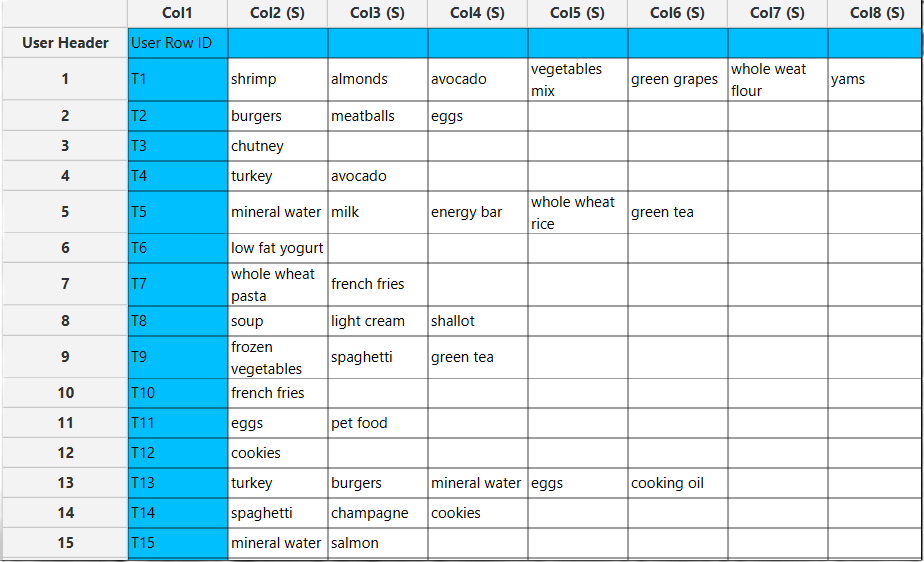
Data matrix with transactions, where each row represents a transaction and each item is placed in a separate cell.
Configuration
| Minimum Support | A float between 0 and 1 representing the minimum support threshold. Itemsets that appear in the dataset less frequently than this value will be ignored. |
| Minimum Confidence | A float between 0 and 1 representing the minimum confidence threshold. Only rules with confidence greater than or equal to this value will be generated. |
| Minimum Lift | A non-negative float representing the minimum lift threshold. Only rules with lift greater than or equal to this value will be considered significant. |
| Maximum Length | An integer representing the maximum number of items allowed in an itemset. |
| No. of Threads | An integer representing the number of CPU threads that the algorithm will use for parallel processing. |
| Frequent Itemsets | Outputs all itemsets that satisfy the configured thresholds. These itemsets show which combinations of items occur frequently together in the dataset. |
| Association Rules | Outputs rules derived from frequent itemsets that satisfy the configured thresholds. Each rule shows a relationship in the form “If item(s) A occur, then item(s) B also occur,” along with metrics like support, confidence, and lift. |
| Implementation Method | Implements two approaches for generating frequent itemsets: - ListApriori: Implemented using a list of lists. Best for sparse transactions with few items per transaction, saving memory. - BooleanApriori: Implemented as a 2D bit array. Best for dense transactions or when fast, vectorized computations are needed. |
| Sort by | Select the metric used to sort the output. |
Output
A data matrix including the frequent itemsets or association rules generated by the algorithm. For each itemset or rule, all relevant metrics are listed in separate columns. If association rules are selected, the antecedent and consequent items are shown in separate columns, along with the additional metrics.
Example
Input
In the left-hand spreadsheet of the tab, import the data matrix containing the transactions. Each row represents a transaction, and each item is placed in a separate cell.
Configuration
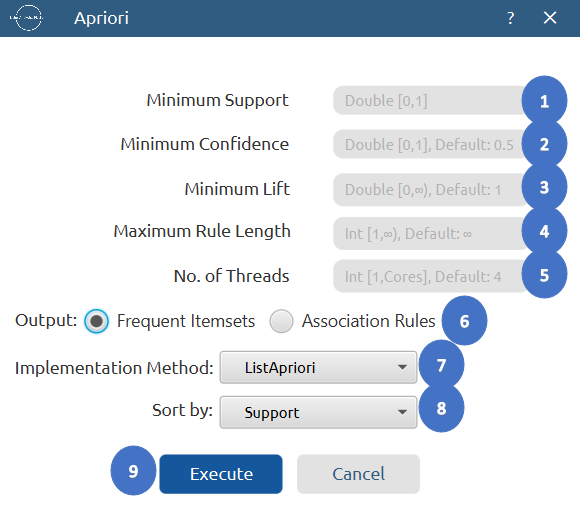
- Select
Statistics\(\rightarrow\)Association Rules\(\rightarrow\)Apriori. - Configure the parameters:
Minimum Support[1],Minimum Confidence[2],Minimum Lift[3] to determine the thresholds for frequent itemsets and association rules. - Set
Maximum Length[4] to define the largest number of items allowed in a frequent itemset. - Set
No. of Threads[5] to define the number of CPU threads used for parallel processing. - Select Output option to choose whether to display
Frequent ItemsetsorAssociation Rules[6] in the output. - Choose Implementation Method either
ListAprioriorBooleanApriori[7]. - Select
Sort By[8] to choose the metric used to order the output. - Click on the
Execute[9] button to apply the algorithm on the input dataset.
Output
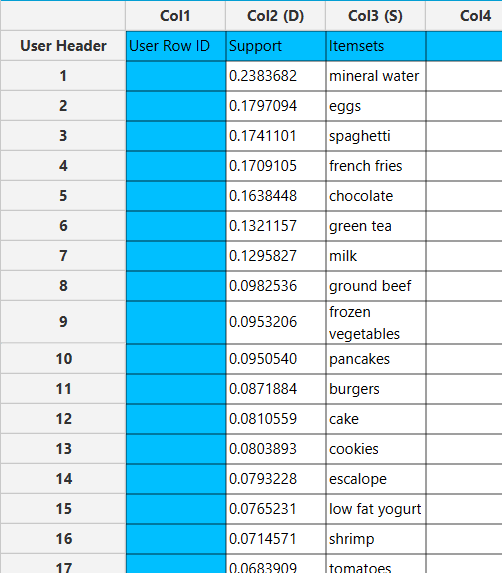
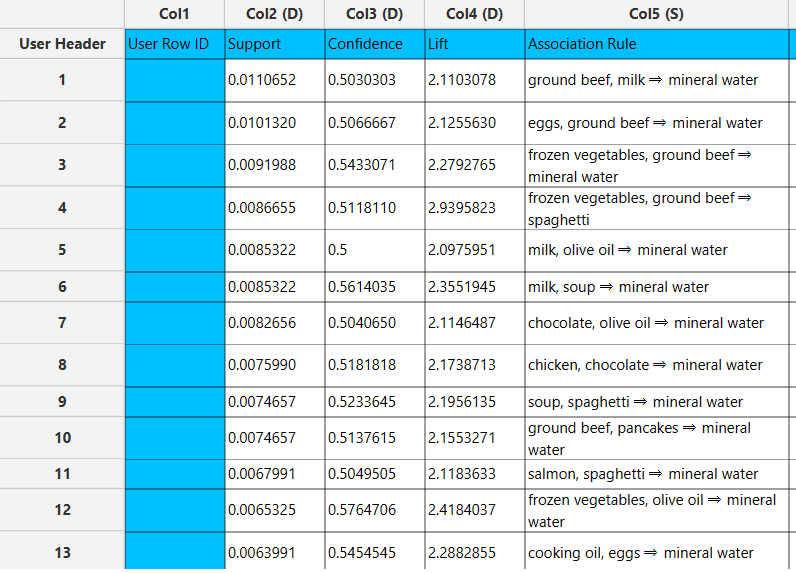
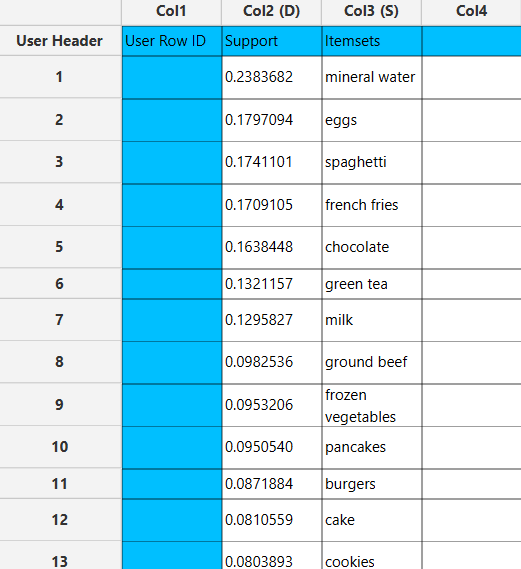
In the right-hand spreadsheet of the tab, the output of the Apriori algorithm is displayed.
If Frequent Itemsets are selected, each itemset is presented together with its corresponding support metric and the list of items it comprises.
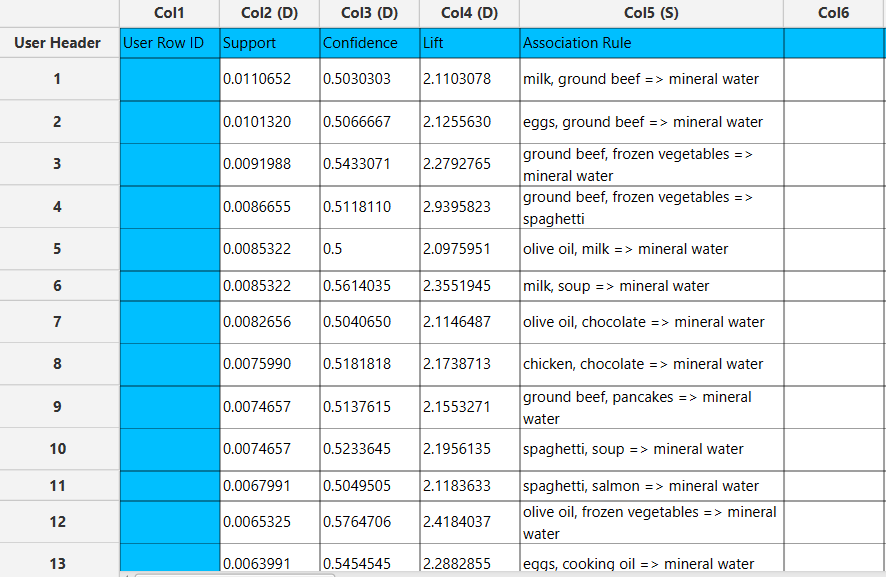
If Association Rules are selected, each rule is presented alongside its corresponding metrics, including support, confidence and lift.
Eclat
The Eclat algorithm is an efficient unsupervised learning method used for mining frequent itemsets. It operates using a depth-first search strategy and represents transactions in a vertical format, where each item is associated with a list of transaction IDs (TIDs) in which it appears. Eclat computes the support of itemsets by intersecting TID lists, making it highly efficient for dense datasets and large itemset combinations. The algorithm avoids repeated full scans of the dataset and expands itemsets recursively, generating candidate itemsets by combining TID lists of frequent subsets. Itemsets that do not satisfy the minimum support threshold are pruned, and all remaining frequent itemsets can be used as the basis for association rule generation in subsequent steps. 5
Use the Eclat association function by browsing in the top ribbon:
| Statistics \(\rightarrow\) Association Rules \(\rightarrow\) Eclat |
Input
Data matrix with transactions, where each row represents a transaction and each item is placed in a separate cell.
Configuration
| Minimum Support | A float between 0 and 1 representing the minimum support threshold. Itemsets that appear in the dataset less frequently than this value will be ignored. |
| Minimum Confidence | A float between 0 and 1 representing the minimum confidence threshold. Only rules with confidence greater than or equal to this value will be generated. |
| Minimum Lift | A non-negative float representing the minimum lift threshold. Only rules with lift greater than or equal to this value will be considered significant. |
| Maximum Length | An integer representing the maximum number of items allowed in an itemset. |
| No. of Threads | An integer representing the number of CPU threads that the algorithm will use for parallel processing. |
| Frequent Itemsets | Outputs all itemsets that satisfy the configured thresholds. These itemsets show which combinations of items occur frequently together in the dataset. |
| Association Rules | Outputs rules derived from frequent itemsets that satisfy the configured thresholds. Each rule shows a relationship in the form “If item(s) A occur, then item(s) B also occur,” along with metrics like support, confidence, and lift. |
| Sort by | Select the metric used to sort the output. |
Output
A data matrix including the frequent itemsets or association rules generated by the algorithm. For each itemset or rule, all relevant metrics are listed in separate columns. If association rules are selected, the antecedent and consequent items are shown in separate columns, along with the additional metrics.
Example
Input
In the left-hand spreadsheet of the tab, import the data matrix containing the transactions. Each row represents a transaction, and each item is placed in a separate cell.
Configuration
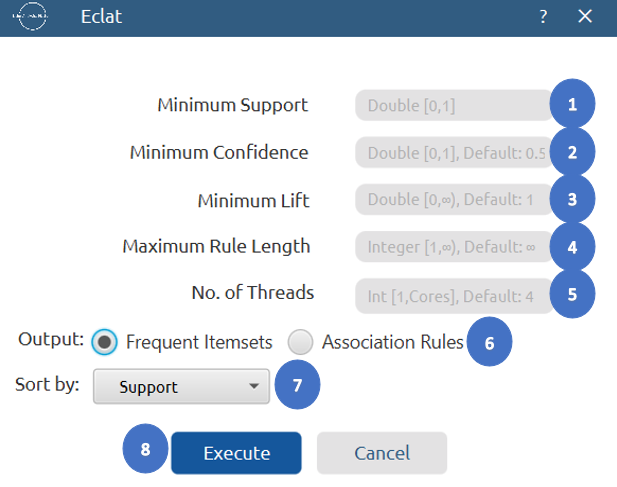
- Select
Statistics\(\rightarrow\)Association Rules\(\rightarrow\)Eclat. - Configure the parameters:
Minimum Support[1],Minimum Confidence[2],Minimum Lift[3] to determine the thresholds for frequent itemsets and association rules. - Set
Maximum Length[4] to define the largest number of items allowed in a frequent itemset. - Set
No. of Threads[5] to define the number of CPU threads used for parallel processing. - Select Output option to choose whether to display
Frequent ItemsetsorAssociation Rules[6] in the output. - Select
Sort By[7] to choose the metric used to order the output. - Click on the
Execute[8] button to apply the algorithm on the input dataset.
Output
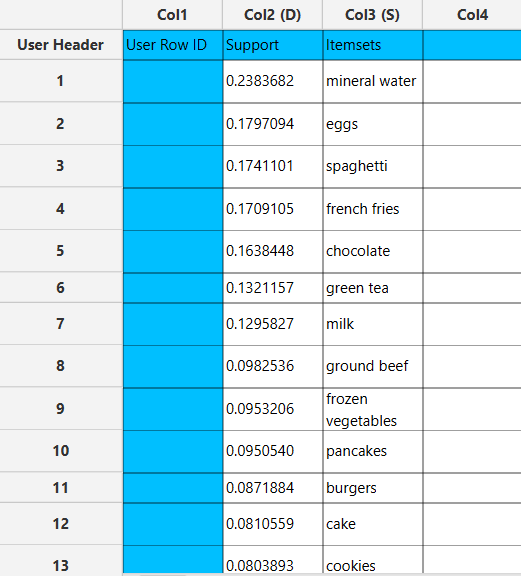
In the right-hand spreadsheet of the tab, the output of the Eclat algorithm is displayed.
If Frequent Itemsets are selected, each itemset is presented together with its corresponding support metric and the list of items it comprises.
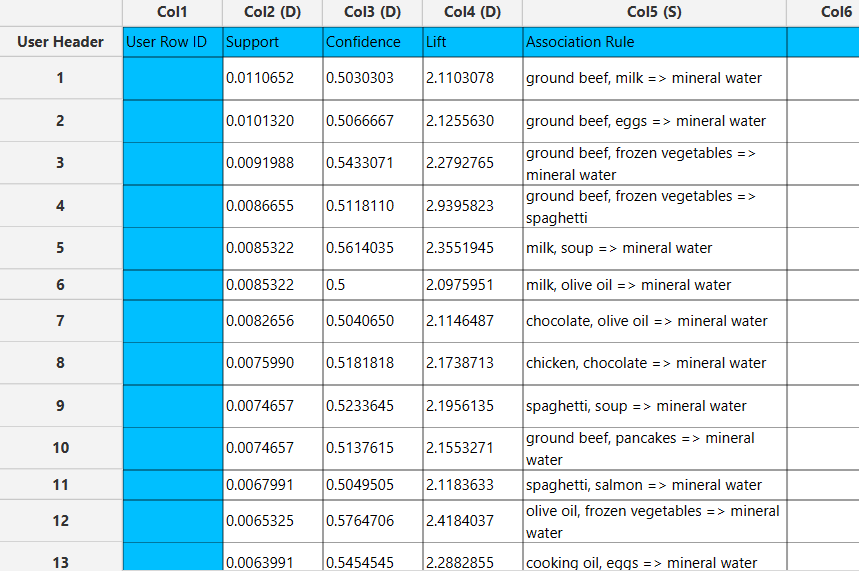
If Association Rules are selected, each rule is presented alongside its corresponding metrics, including support, confidence and lift.
FP-Growth
The FP-Growth algorithm is a highly efficient unsupervised learning method for mining frequent itemsets without generating candidate itemsets explicitly. It operates by compressing the transaction database into a compact structure called the FP-tree, which stores item frequencies and conditional patterns in a hierarchical format. This tree-based representation eliminates the need for repeated database scans and significantly reduces computational overhead, especially in large or sparse datasets. FP-Growth extracts frequent itemsets by recursively constructing conditional FP-trees for each item and exploring their conditional pattern bases. Itemsets that meet the minimum support threshold are retained, while those that do not are discarded during the pattern-growth process. The resulting frequent itemsets can subsequently be used to generate association rules based on confidence and other evaluation metrics. 6
Use the FP Growth association function by browsing in the top ribbon:
| Statistics \(\rightarrow\) Association Rules \(\rightarrow\) FP Growth |
Input
Data matrix with transactions, where each row represents a transaction and each item is placed in a separate cell.
Configuration
| Minimum Support | A float between 0 and 1 representing the minimum support threshold. Itemsets that appear in the dataset less frequently than this value will be ignored. |
| Minimum Confidence | A float between 0 and 1 representing the minimum confidence threshold. Only rules with confidence greater than or equal to this value will be generated. |
| Minimum Lift | A non-negative float representing the minimum lift threshold. Only rules with lift greater than or equal to this value will be considered significant. |
| Maximum Length | An integer representing the maximum number of items allowed in an itemset. |
| No. of Partitions | Sets the number of partitions used by parallel FP-growth. |
| Frequent Itemsets | Outputs all itemsets that satisfy the configured thresholds. These itemsets show which combinations of items occur frequently together in the dataset. |
| Association Rules | Outputs rules derived from frequent itemsets that satisfy the configured thresholds. Each rule shows a relationship in the form “If item(s) A occur, then item(s) B also occur,” along with metrics like support, confidence, and lift. |
| Sort by | Select the metric used to sort the output. |
Output
A data matrix including the frequent itemsets or association rules generated by the algorithm. For each itemset or rule, all relevant metrics are listed in separate columns. If association rules are selected, the antecedent and consequent items are shown in separate columns, along with the additional metrics.
Example
Input
In the left-hand spreadsheet of the tab, import the data matrix containing the transactions. Each row represents a transaction, and each item is placed in a separate cell.
Configuration
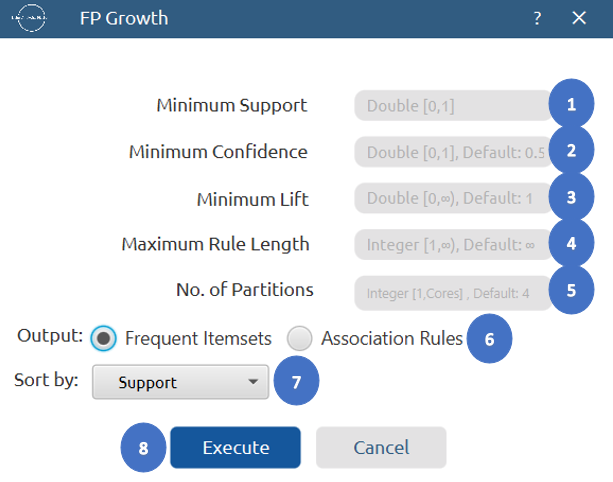
- Select
Statistics\(\rightarrow\)Association Rules\(\rightarrow\)FP Growth. - Configure the parameters:
Minimum Support[1],Minimum Confidence[2],Minimum Lift[3] to determine the thresholds for frequent itemsets and association rules. - Set
Maximum Length[4] to define the largest number of items allowed in a frequent itemset. - Set
No. of Partitions[5] to divide the dataset into for parallel implementation. - Select Output option to choose whether to display
Frequent ItemsetsorAssociation Rules[6] in the output. - Select
Sort By[7] to choose the metric used to order the output. - Click on the
Execute[8] button to apply the algorithm on the input dataset.
Output
In the right-hand spreadsheet of the tab, the output of the Eclat algorithm is displayed.
If Frequent Itemsets are selected, each itemset is presented together with its corresponding support metric and the list of items it comprises.
If Association Rules are selected, each rule is presented alongside its corresponding metrics, including support, confidence and lift.
✧ Tips
- It works well for small to medium-sized datasets; performance drops significantly for very large datasets due to candidate generation overhead.
- Setting the minimum support too low can lead to an exponential increase in candidate itemsets and memory usage.
- Efficient for dense datasets and larger itemsets due to its vertical representation of transactions.
- Memory usage can become high if many itemsets have large transaction ID lists.
- Highly efficient for large datasets compared to Apriori, as it avoids candidate generation.
- Extremely long or frequent patterns can still increase memory usage; consider limiting maximum pattern length.
References
-
Agrawal R, Imieliński T, Swami A. Mining Association Rules Between Sets of Items in Large Databases. In: Proceedings of the ACM SIGMOD International Conference on Management of Data. ACM; 1993:207–216. https://dl.acm.org/doi/pdf/10.1145/170035.170072
-
Brin S, Motwani R, Ullman JD, Tsur S. Dynamic Itemset Counting and Implication Rules for Market Basket Data.
In: Proceedings of the ACM SIGMOD International Conference on Management of Data. ACM; 1997:255–264. https://dl.acm.org/doi/pdf/10.1145/253260.253325 -
Agrawal R, Srikant R. Fast Algorithms for Mining Association Rules.
IBM Almaden Research Center; 1994. https://www.vldb.org/conf/1994/P487.PDF -
Srikant R. Fast Algorithms for Mining Association Rules.
PhD Thesis, University of Wisconsin–Madison; 1996. https://rsrikant.com/papers/thesis.pdf -
Zaki MJ, Parthasarathy S, Ogihara M, Li W. New Algorithms for Fast Discovery of Association Rules.
In: Proceedings of the ACM SIGKDD Conference on Knowledge Discovery and Data Mining; 1997. https://cdn.aaai.org/KDD/1997/KDD97-060.pdf -
Han J, Pei J, Yin Y. Mining Frequent Patterns without Candidate Generation.
In: Proceedings of the ACM SIGMOD International Conference on Management of Data; 2000. https://www.cs.sfu.ca/~jpei/publications/sigmod00.pdf
Version History
Introduced in Isalos Analytics Platform v2.0.0
Instructions last updated on January 2026